
How to Build an AI Image Generator SaaS with Credits and Subscriptions
A practical guide to building an AI image SaaS with prompt and reference-image generation, private history, reliable credit billing, Stripe subscriptions, and credit packs.
How to Build an AI Image Generator SaaS with Credits and Subscriptions
An AI image product is not just a text box connected to a model API. The difficult part is everything around that API call: accepting the right inputs, preventing duplicate jobs, charging at the correct moment, returning credits after failures, protecting generated files, and turning variable generation costs into a price customers understand.
This guide walks through those decisions using the implementation behind the LaunchSaaS AI Image App template. The workflow, credit lifecycle, private storage, generation history, and Stripe billing described below are implemented in the template. Pricing strategy outside the current template defaults is presented as a recommendation, not as shipped product behavior.
1. Start With a Focused Image Product
The underlying infrastructure can support many image businesses, but the product should start with one clear job:
- An ecommerce image tool turns product photos into campaign-ready scenes.
- A pet portrait app transforms an uploaded photo into a chosen visual style.
- A social content tool creates correctly sized images for posts and ads.
The niche changes your onboarding, default prompts, aspect ratios, and pricing. It does not change the core system: a user provides a prompt or reference image, the app creates a metered generation job, the provider returns an image, and the product saves the result to private history.
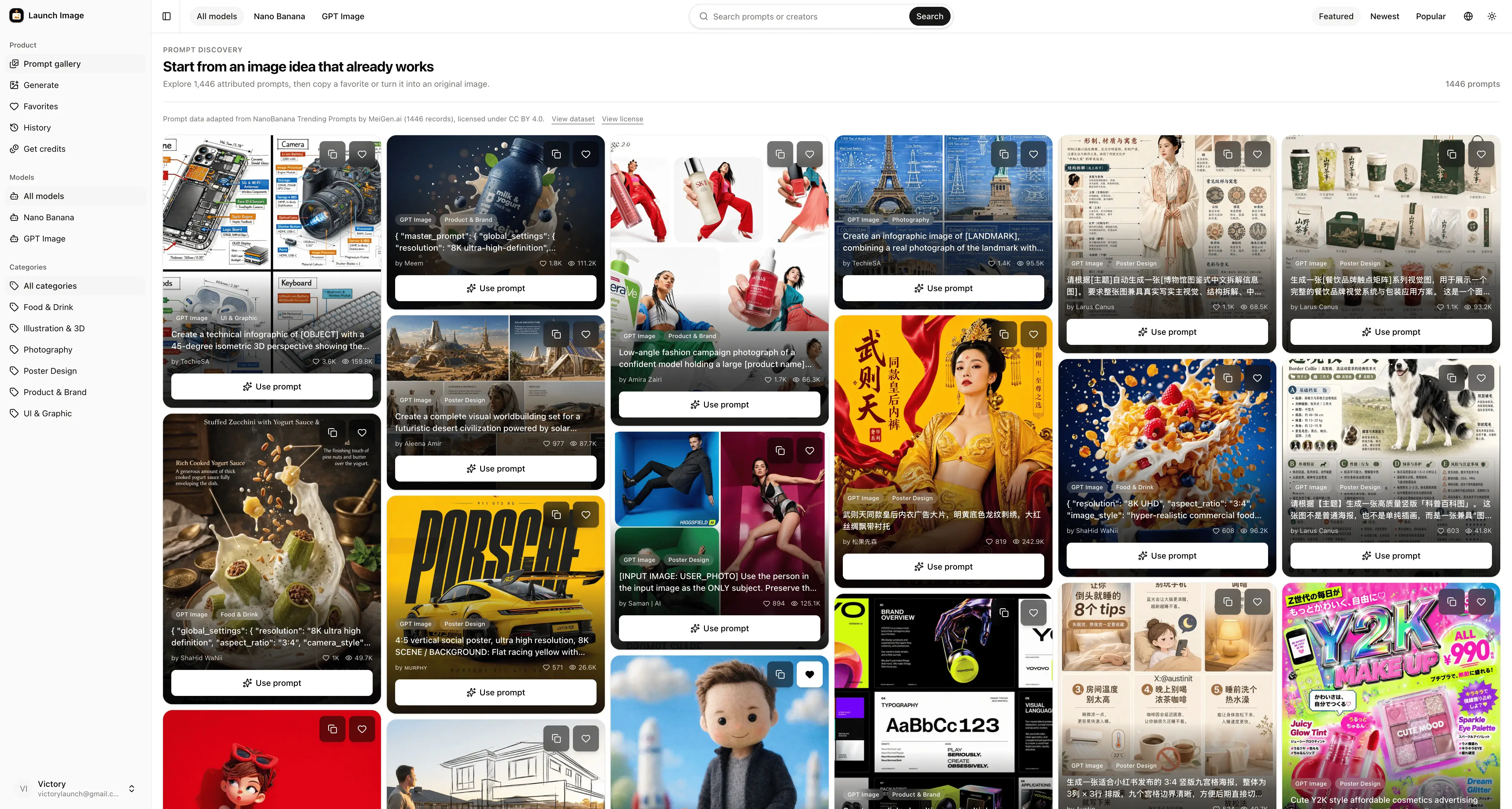
Launch Image ships as a broader prompt discovery and generation product. Its public gallery helps users start from proven prompts, while the generator, credits, billing, and private workspace provide the reusable SaaS foundation. A buyer can narrow that foundation to a vertical without rebuilding the accounting and delivery layers.

The public prompt gallery gives users a useful starting point before they spend a credit.
2. Build the Complete Generation Workflow
A reliable generation flow has four stages: validate, reserve, generate, and finalize.
Validate the request on both sides
The form accepts a prompt, optional reference images, a model, an aspect ratio, a resolution, and a quality setting. Browser validation gives immediate feedback, but the server repeats every important check because client-side rules can be bypassed.
The current model catalog defines capability and credit rules in one place. For example, FLUX.2 [klein] 4B supports 1K and 2K output and up to four reference images no larger than 512 × 512 pixels. Other configured models expose their own resolution, reference-image, and quality limits. The server rejects combinations the selected model cannot process.

The generator keeps the input, estimated credit cost, model controls, and result in one workflow. This product capture predates the latest FLUX reference-image update; the current implementation supports up to four compatible FLUX references.
Reserve the job before calling the provider
After validation, the server calculates the credit cost and inserts a pending generation record. That insert is the reservation boundary. A D1 trigger checks the user's balance and subtracts the credits atomically.
This ordering matters. If the app calls an image provider first and charges later, concurrent requests can spend the same balance or create an expensive image for an account that cannot pay. Reserving first establishes ownership, cost, and state before external work begins.
Conceptually, the sequence is:
validate request
  -> insert pending generation
  -> atomically reserve credits
  -> call image provider
  -> save image to private object storage
  -> mark generation as succeeded
The template supports Cloudflare Workers AI through an AI binding, with optional Google and OpenAI adapters when their credentials are configured. The default FLUX path therefore does not require a separate third-party API key in staging or production.
Save the image privately, then finalize the record
Generated bytes are stored in a private Cloudflare R2 bucket under a deterministic user and generation path. D1 stores the object key and generation metadata rather than the image itself.
R2 and D1 cannot participate in one shared transaction, so the template treats the pending D1 row as the ownership reservation. The image is reported as successful only after the object has been stored and that exact pending row has changed to succeeded. If finalization loses the reservation, the code deletes the object or preserves a cleanup reference instead of exposing an untracked image.
Images are served through an authenticated route that verifies the generation belongs to the current user. Responses use private, no-store caching rules, and the same route can return a download attachment. Knowing an object key is not enough to retrieve another user's image.
Make history part of the product
Generation history is not an afterthought. It is where users recover value from previous spending. Launch Image records the prompt, model, aspect ratio, resolution, quality, status, credit cost, timestamps, and stored-image reference.
The private history page lets a user filter completed and failed jobs, reuse a prompt, view the output, or delete a finished record and its R2 object. Ownership is enforced in server queries and image delivery, not only by hiding navigation links.

Each result remains connected to the prompt and settings that produced it.
3. Design Credits Without Double-Charging
Credits turn a variable infrastructure cost into a unit customers can understand. They also create accounting problems that a simple credits = credits - 1 update cannot solve safely.
Deduct when the job is accepted
Launch Image deducts credits when the pending generation row is inserted—not when the button is clicked in the browser and not after the provider succeeds.
That boundary has useful properties:
- Invalid requests cost nothing because they never reach the insert.
- Insufficient balances fail before an external provider call.
- Concurrent requests cannot both spend the same credits.
- Every accepted charge has a generation ID and recorded cost.
The cost is calculated from the server-owned model catalog. A standard FLUX 1K generation currently costs 1 credit, while FLUX 2K costs 4 credits. Different models, resolutions, and supported quality settings can carry different costs, and the UI shows the same calculated amount before submission.
Refund through a state transition
Provider errors, missing optional provider credentials, rate limits, and storage failures can happen after the reservation. When a pending job changes to failed, a D1 trigger adds the original creditCost back to the user's balance.
The refund is tied to the state transition rather than scattered through every error branch. Only pending → failed refunds the reservation, so the same failed job cannot refund twice.
A Worker can also stop between reservation and finalization. On the user's next product request, the recovery path finds pending jobs older than 15 minutes, removes any object stored under their deterministic R2 prefix, and marks them failed. The normal database trigger then refunds the credits.
Make retries idempotent
Browsers retry requests. Users double-click. Mobile connections disappear after the server has already accepted a job.
Each submission therefore includes an idempotency key. The database enforces a unique constraint on (userId, idempotencyKey). If the same request arrives again, the API returns the existing generation status and image URL instead of inserting a second row, deducting again, or starting another provider call.
The important lesson is that an idempotency key is not just a frontend flag. It must be backed by a unique database constraint at the same boundary that reserves the credits.
Keep an append-only credit ledger
The current balance answers “How many credits can this user spend?” It cannot answer “Why is this the balance?”
Launch Image maintains an append-only credit_transaction ledger alongside the balance. Each row records a signed amount, resulting balance, reason, optional reference ID, and timestamp. D1 triggers write the ledger entry in the same transaction as the balance change.
The ledger covers:
- trial and opening balances;
- generation debits and failure refunds;
- one-time credit-pack grants, reversals, and restores;
- subscription grants, reversals, and restores.
Users can inspect only their own activity. Administrators have a separately authorized, paginated view with server-side filters for user and activity type. Deleting a generation does not erase its accounting history.

The balance is the spendable projection; the transaction ledger remains the audit trail behind it.
4. Combine Subscriptions, Credit Packs, and a Safe Launch
There is no universal “right” number of credits. Begin with the cost of one successful generation:
model inference
+ expected cost of failed attempts
+ storage and delivery
+ payment fees
+ support and operating margin
= minimum sustainable selling price
Then decide how customers prefer to buy that usage. Subscriptions work well for repeat users because they provide a predictable allowance and recurring revenue. One-time packs work well for occasional users, seasonal projects, and subscribers who need extra capacity. A simple hybrid usually needs only one clear subscription and one top-up pack at launch.
The current template ships with these editable defaults:
| Offer | Price | Included credits | Effective price |
|---|---|---|---|
| Free account | $0 | 10 trial credits | — |
| Pro monthly | $19/month | 100 per paid invoice | $0.19/credit |
| Pro yearly | $180/year | 1,200 per paid invoice | $0.15/credit |
| Starter Pack | $29 once | 100 | $0.29/credit |
These are template defaults, not pricing advice for every image niche. Replace them after measuring your provider cost, average retry rate, customer value, and target margin. The relationship is intentional: the subscription offers a lower effective credit price in exchange for recurring commitment, while the pack offers flexibility without starting a subscription.

Subscription management and one-time purchase history are part of the authenticated product.
The payment lifecycle needs the same care as generation billing. In the shipped implementation:
- A verified paid Pro invoice grants 100 monthly or 1,200 yearly credits.
- Stripe retries do not duplicate a grant.
- A verified full refund or dispute reverses the matching grant once.
- A won dispute restores the credits once.
- Partial refunds are acknowledged for manual review rather than guessing a proportional credit adjustment.
- A paid Starter Pack checkout grants 100 credits, with equivalent idempotent reversal and restoration handling.
Credits already granted for a paid subscription period do not expire merely because the user cancels renewal.
A practical launch checklist
To ship your own version of the template:
- Choose the image niche and replace the broad gallery copy, prompt data, and default settings.
- Provision separate Cloudflare D1 and private R2 resources for staging and production.
- Configure the default Workers AI model or add the optional Google and OpenAI credentials you plan to support.
- Set the monthly, yearly, and one-time Stripe prices, then update the catalog's credit amounts and display prices together.
- Test successful generation, provider failure, duplicate submission, insufficient credits, paid invoices, full refunds, and disputes on isolated staging before production.
That is the difference between an image demo and an image SaaS: the finished product can create, save, meter, refund, sell, and explain every generation.
The LaunchSaaS AI Image App template already includes the prompt gallery, authenticated generator, private R2 image delivery, generation history, atomic D1 credit accounting, transaction ledger, Stripe subscriptions, one-time credit packs, bilingual UI, and admin workflows. You can start with the working system and spend your time on the niche, model experience, and distribution that make the product yours.